Portfolio
Follow your positions across networks, act on them and claim yield and rewards.
Portfolio shows every Spectra position of the connected wallet across networks, with the actions each one allows. Open it from the top bar and select Connect wallet.
Read the page
- Net value sums your priced positions and claimable rewards. Claimable sums the yield and rewards you can claim now. An info icon names anything left out because it has no price.
- The tabs split positions by product: MetaVaults, Pools (LP), Fixed Rate (PT), Yield Leverage (YT), Wrapped and Rewards. Open orders lists your open limit orders, and History your past activity.
- The filters narrow each tab by network, search, value, maturity, Claimable only or, for MetaVaults, Open requests only. Positions worth less than $1 are hidden by default; change this under Value or in Settings.
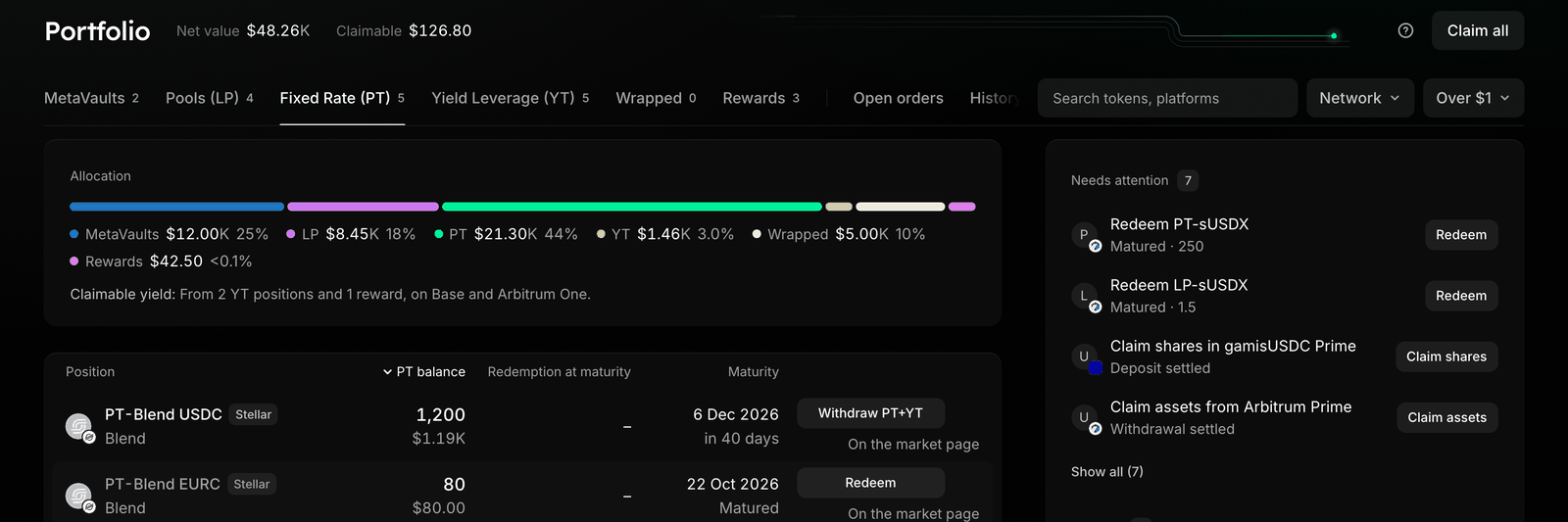
Illustration with a sample account; your positions will differ.
Act on a position
Each row has a main button for its most likely action; other actions are in the row's actions menu.
| Tab | Actions |
|---|---|
| Fixed Rate (PT) | Redeem at maturity, Roll over, Withdraw PT+YT when you hold matching YT, Buy or sell |
| Yield Leverage (YT) | Claim yield, Buy or sell |
| Pools (LP) | Add or remove before maturity, Redeem LP after, Roll over when a later pool exists |
| MetaVaults | Manage, Deposit, Withdraw, Claim shares, Claim assets |
| Wrapped | Wrap, Unwrap, Redeem |
Buy or sell and Add or remove open the market page, and the MetaVault Manage, Deposit and Withdraw actions open the vault page. The other actions open a panel on Portfolio. See the guides for redeeming PT, rolling over, claiming yield, redeeming LP, MetaVaults and wrapped assets.
Needs attention
The panel beside your positions lists what needs action, such as Redeem …, Roll over …, Claim yield and rewards, MetaVault claims, limit orders out of their rewards range and positions in legacy pools to Migrate. Each card has its action button. Dismiss a card to hide it; Dismiss all hides the rest. It follows the page's network, search and value filters. Below it, Pending lists transactions and bridge transfers still in progress, and Coming up lists the next maturity and lock-end dates of your positions.
Claim all
- Select Claim all at the top of the page.
- Review the claims in Review Claim all: each row shows the amount and its dollar value.
- Select Claim all and confirm each claim in your wallet. Each claim is its own wallet prompt.
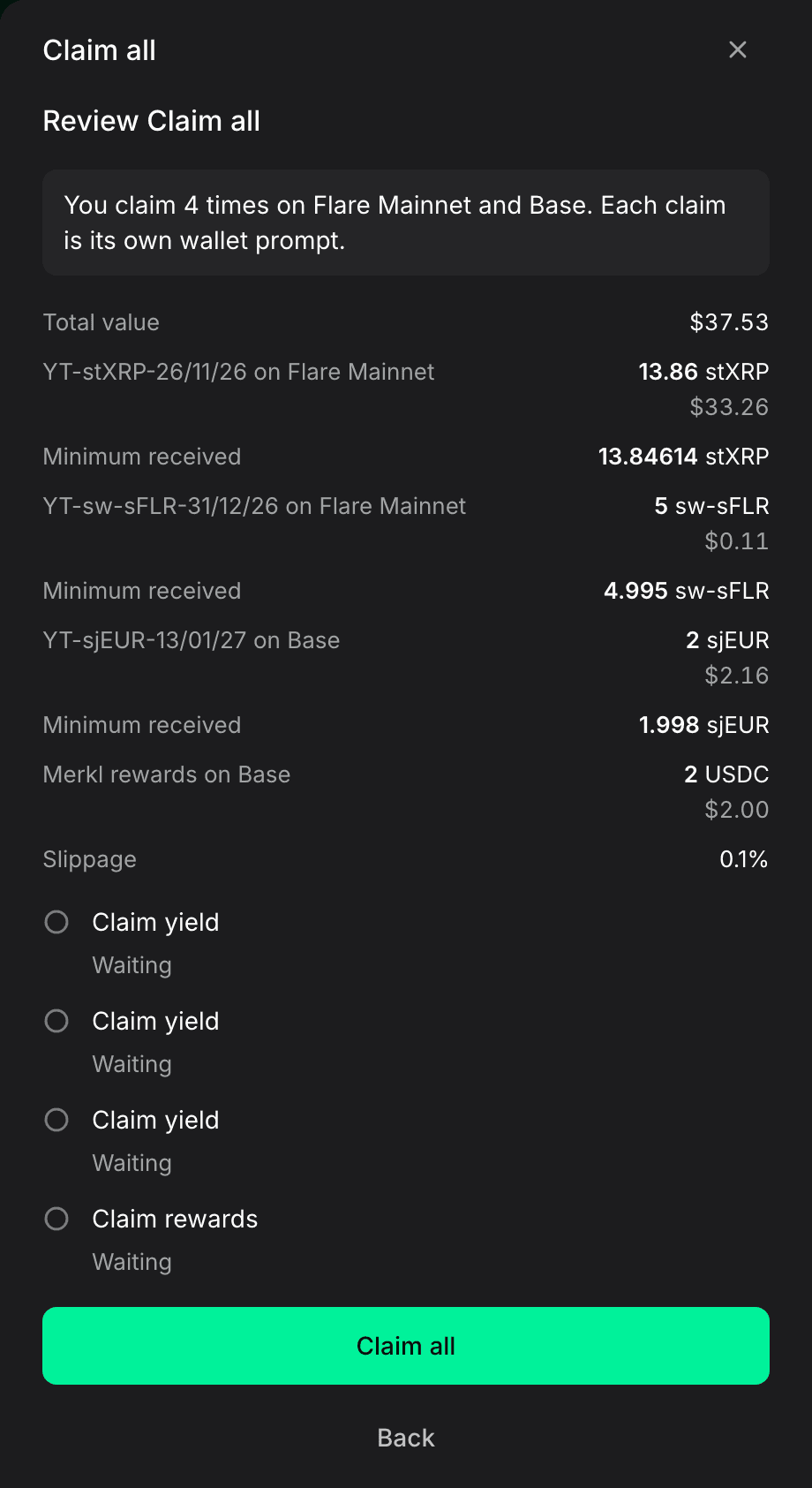
Illustration with a sample account; your positions will differ.
Claim all collects YT yield and Merkl rewards on EVM networks. It does not include Stellar positions (claimed on their market pages), Stellar rewards (claimed in Rewards), MetaVault claims or governance voting rewards.
Rewards
The Rewards tab lists claimable incentive rewards by network. Select Claim on a reward, or Claim all on a network group, check Review claim, then select Claim rewards. To claim a Stellar reward, your Stellar wallet needs a trustline for the reward token.
Some rewards are claimed outside Spectra. rFLR rewards on Flare are claimed on the Flare Portal: see Flare rewards in the menu at the right of the top bar.
Restricted regions
Where tokenized equity markets are restricted, Portfolio still shows those positions with Restricted in your region. Redemption, Withdraw PT+YT, Claim yield and Redeem LP remain available. See regional availability.